My own password Manager


In our time, it is not a secret that we need to use a password manager. It's impossible to keep a lot of passwords in memory, and even if you use some strategy—maybe some mnemonics—it's really difficult.
Safe situation password managers that we already have in our browsers, like Chrome and Firefox. And it's really good, you know. For example, I use Chrome on my mobile and I use it on my PC. It's very comfortable; if I create a new password, I have it on my PC and on my mobile. It saves a lot of time. At the same time, I have Firefox, and it's the exact same situation with Firefox, which is really great from one side.
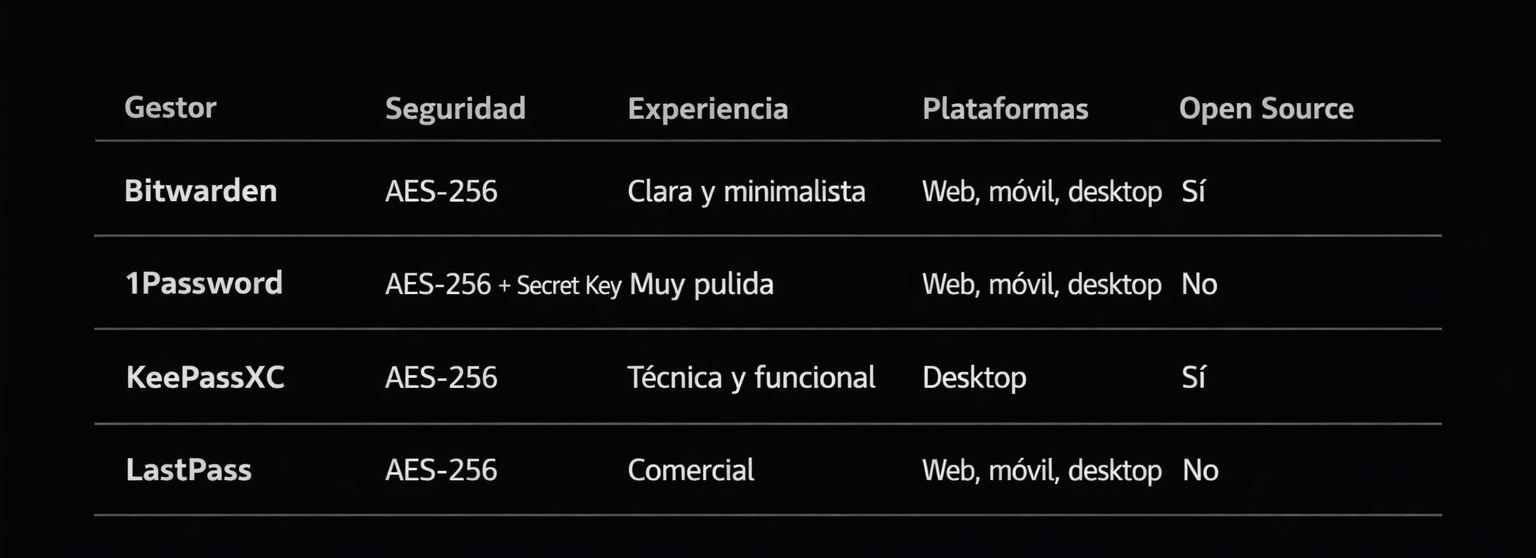
And there are plenty more password managers that we can use. Here is a small list of them:
- Bitwarden
- 1Password
- KeePassXC
- LastPass
The last one has some problems. It has had multiple high-profile data breaches in its past. I don't know how it is today, but I cannot recommend using it.
The thing is, all of them offer you some kind of infrastructure. Some of them are completely free, some are open source, and some you can self-host. It's very secure if you do everything right, and we have really great options here.
But sometimes, it is not enough. Every one of us has our own reasons, and no single password manager covers all of our wishes. Maybe we want other ways to handle our passwords. There is actually a solution that doesn't depend on any company: you can create your own password store without any problems.
The simple way to do it is to write your passwords in a simple text file, pack it using 7-Zip, for example, and use a "master password" to open the 7z file. In general, you get the same result: you click twice on your archive, it opens, you provide your master password, and you see all your passwords. You know, from one side, it is secure. Maybe even, in some cases, it's more secure than using professional applications. Of course, you aren't protected from keyloggers and other sly things that can be used against you to get your hidden data. Of course, you still have that risk.
As for me, the main reason why I don't want to use professional password managers everywhere is because they dictate the structure of how you should keep your passwords. And to be honest, I don't like it. It's not freedom. What do I actually need, to be honest? In general, we don't need much: synchronization, backup, and safety.
It is good when your passwords are synchronized across all applications. Yes, it is just like I said about Chrome. We have mobiles, PCs, and laptops. All synchronized. You have your passwords everywhere. It's very comfortable to use, so I have this as well, and it's really great, you know.
The thing is, I store not only passwords; I have maybe some images, maybe some files, and so on. I cannot use the services provided by password managers from Google, Mozilla, etc., to store those. And here, a 7z encrypted archive really saves the situation, because you can create an encrypted folder where all the data is structured well by you.
For some time, I did it this way, and I really liked it—it's really comfortable. Yes, there is a small problem: you need to find an application to open 7-Zip on mobile. I don't keep all my passwords in one place, of course. In the archive, I don't keep passwords that I use every day ( actually I kept them ) —not my Google account or my Firefox account. No, I keep it like my safe house, like my main backup of passwords, you know? I keep my passwords there so that even if I have a problem with Firefox or some other application where I keep them, I always know that my source of trust is secure and I can find the password I need. Sometimes I just copy it to Google Drive, and you know, I think it is sufficiently secure.
Of course, it is maybe not the best solution, and I am definitely sure that it is not the ultimate best solution, but it is okay for now. Yes, you need to do a lot of manual work. You need to open the archive and enter your master password every single time. You need to make a backup of your archive every time, and it takes effort.
But you can make things a little bit simpler. You can use some small scripts; you can write them in Windows or you can write them in Linux, it is not important. It makes it a bit simpler so that it will automatically copy from your folder to Google Drive, for example. I'm sure Google Drive is secure; I don't think they will lose your data. So I have several places where I copy it ( Who knows ? ) ). Even if someone gets your archive, it's encrypted data—they cannot get anything. I think it's okay.
I don't want to tell you that this is the only solution you should use. As I said before, I think it can just be an addition to the modern professional solutions we have on the market, most of which are free anyway. So you can use both ways, and I think some people will find value in this.
In economics, they say don't keep all your eggs in one basket—it's all about diversification. I do the same with my data.
As for myself, I used this method, as I mentioned, for a while. And then I found a way that is a bit better—the same core idea, but much more interesting. I will tell you about it next.
7z
My own password manager